Mobile App | Healthcare SaaS | Workflow Optimization
Improving planning with a versatile calendar interface
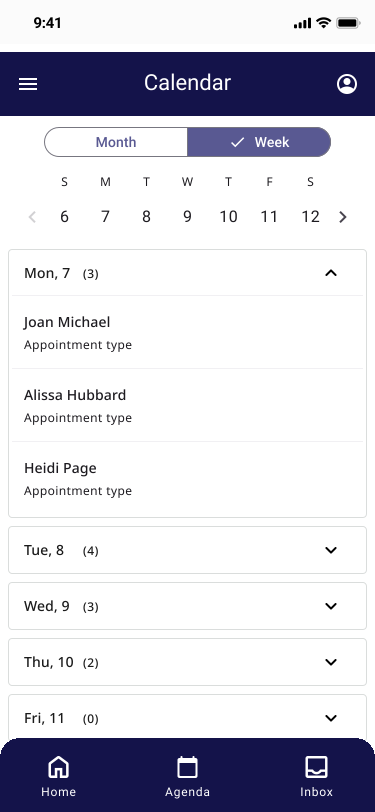
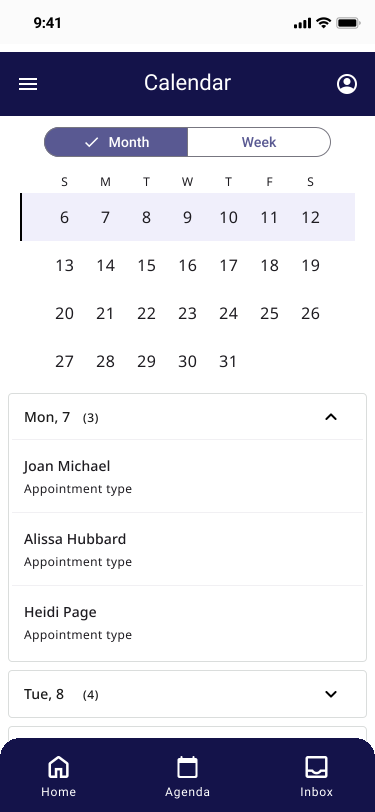
Overview
This project enhanced the mobile calendar experience within a legacy app used by users to manage their daily visits and tasks. The previous 7-day view limited users' ability to plan long-term, and failed to meet the needs of all user groups. By introducing a flexible 28-day view alongside the original layout, we improved task visibility, scheduling efficiency, and user satisfaction across diverse roles.
Scope
Role: UX Designer (solo)
Responsibilities: Research, prototyping, preference testing, developer collaboration
Tools: Figma, user interviews, preference testing, stakeholder workshops
Results
Increased planning efficiency for long-term task management
Improved user satisfaction by aligning with diverse planning behaviors
Reduced need for external tools or workaround strategies
Maintained system usability by building on familiar patterns
Challenge
The legacy app’s 7-day view had become outdated and inflexible for users needing a broader overview. While stakeholders initially requested a 28-day view, early exploration revealed that this solution didn’t fully account for the different personas using the app, each with distinct planning needs and workflows.
Goal
Design a new calendar view that supports both short- and long-term planning without sacrificing clarity or usability, and ensure the interface meets the needs of multiple personas in a high-stakes, clinical environment.
Process
Discovery
Conducted interviews with users across different roles to uncover scheduling pain points and planning behaviors.
Mapped out key differences in how each persona interacted with the calendar to identify critical gaps.
Design
Developed multiple calendar prototypes with variations in layout, interactions, and information hierarchy.
Prioritized clarity and fast scannability while preserving the functionality of the existing 7-day view.
Ensured toggling between views was seamless and required minimal cognitive effort.
Validation
Ran preference testing with representatives from each user group to compare concepts and gather direct feedback.
Collaborated with developers to navigate technical constraints and adapt the design within the system’s architecture.
Solution
A new 28-day calendar interface was added alongside the existing weekly view. Users can now toggle between planning modes to match their workflow needs, increasing visibility of upcoming visits and reducing planning time. The design prioritized usability for both day-to-day and longer-term scheduling tasks.

Key takeaways
Designing for multiple personas requires flexibility and deep understanding of their workflows.
Preference testing is a powerful way to ensure confidence in design direction.
Collaborating early with developers helps ensure technically feasible solutions that maintain design intent.